While building the blog section of my portfolio, I wanted posts to support more than just text and images. I added social media embeds so I could drop in posts from Twitter, Instagram and Facebook when they were relevant.
It worked. Technically.
But then I noticed something annoying. The embedded post had its own scrollbar
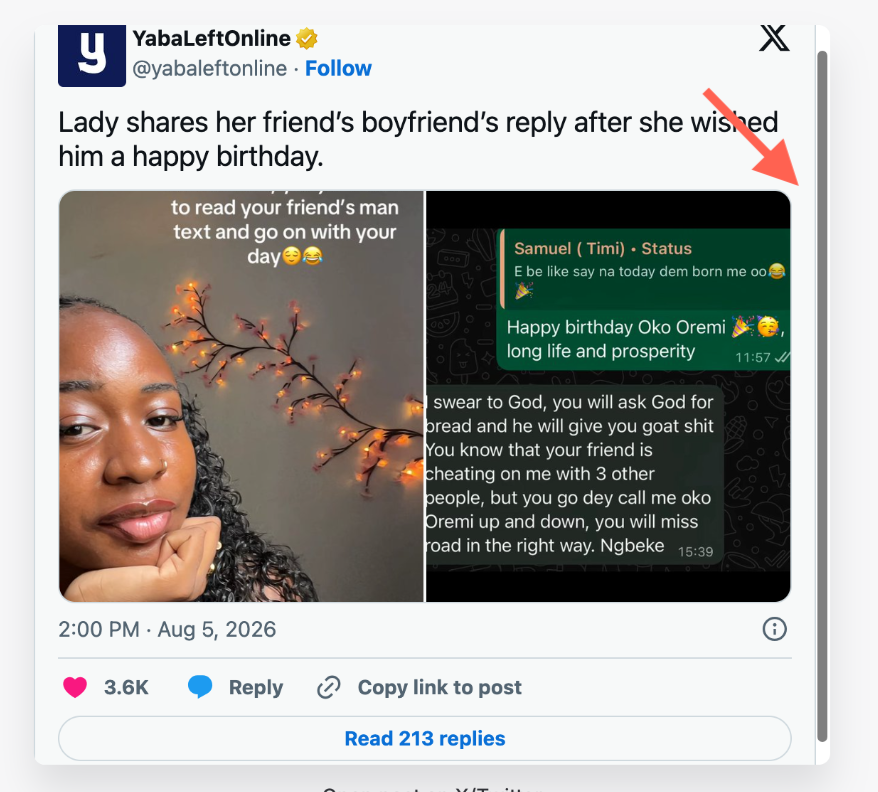
Instead of naturally taking up the height it needed, the post was trapped inside a fixed container, so you had to scroll inside the embed just to read it. That's definitely not the experience I wanted (as someone who likes to do things cleanly 😏)
The problem
My first implementation treated the social post like a regular iframe.
It was something along these lines:
<iframe
    src="..."
    class="w-full h-[500px]"
></iframe>
At first glance, it looked fine.
The problem was the fixed height.
The actual social post could be taller than the iframe, so the browser had no choice but to create an internal scrollbar.
That was the first clue for me: the content itself was not really the problem. The container was.
What I changed
For Twitter posts, I moved away from forcing the content into a fixed-height iframe and used the platform's embed markup instead.
<blockquote class="twitter-tweet">
    <a href="https://twitter.com/example/status/123456789"></a>
</blockquote>

<script
    async
    src="https://platform.twitter.com/widgets.js"
    charset="utf-8">
</script>
This allowed the embed to render at the height it actually needed instead of being squeezed into a predefined box.
I also made sure the wrapper itself was not restricting the embed:
.social-embed {
    width: 100%;
    max-width: 100%;
    overflow: visible;
}
No fixed height. No unnecessary overflow-y: auto.
The small lesson here
The fix itself was simple.
The important part was finding where the problem actually was.
I could have kept increasing the iframe height, but that would only fix one post at a time.
Once I let the embed control its own height, everything became much cleaner.
Check it out...
And yes, that tiny scrollbar annoyed me enough to write about it...😩

Lanre Malumi
https://lanremalumi.laravel.cloud
Most days, Lanre is somewhere between a Figma file and a Laravel project, trying to make both behave. Accessibility isn't an afterthought for him. "Works for everyone" is the actual bar, not a nice-to-have. When he's not working on something, he's probably watching a movie, overthinking a scene, or adding yet another title to his watchlist.
You might also like...
25 Aug, 2026
Laravel 13.26 Made Queue Rerouting Much Cleaner
I recently wrote about some of the queue improvements in Laravel 13.25, especially the ability to pause all queues at once. Then Laravel 13.26 showed...
 0
0
15 Aug, 2026
When WordPress Stopped Making Sense
For a long time, WordPress was more than enough for what I needed. I had used it for regular websites, ecommerce projects, content management and clie...
13 Aug, 2026
A Few Things I Noticed in Laravel 13.25
Laravel 13.25 landed with some updates and fixes. Rather than go through everything in the release, three changes stood out to me, particularly becaus...
Comments
0 approved comments
No approved comments yet.